Device Authentication
Review and approve device authentication requests to link agent installations to Pult users.
When a Pult Agent initiates enrollment (either via manual sign-in or bootstrapping), a Device Auth Request is created. Admins review these requests in the Pult Dashboard to link devices to the correct Pult users.
How It Works
-
The agent sends a request containing:
- Device name (hostname)
- Operating system and version
- Device serial number
- OS username
- Bootstrap token (if bootstrapping)
- Source IP address
-
The request appears under Settings → Presence → Device Authentication → Pending Requests.
-
An admin reviews the request and either approves (matching it to a Pult user) or denies it.
-
Once approved, the agent receives an access token and begins sending presence beacons.
Automatic User Matching
If you have an MDM integration connected, Pult can automatically suggest the matching user:
- Pult looks up the device's serial number in the MDM inventory.
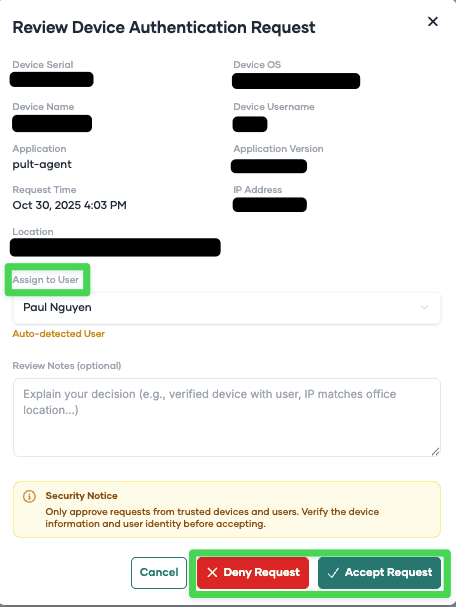
- If a matching device is found with an assigned user email, and that email corresponds to a Pult user, the user is pre-selected in the review dialog.
- An admin still needs to explicitly approve the request.
Without MDM, or if the serial number isn't found, the admin manually selects the user.
Reviewing Requests
Pending Requests
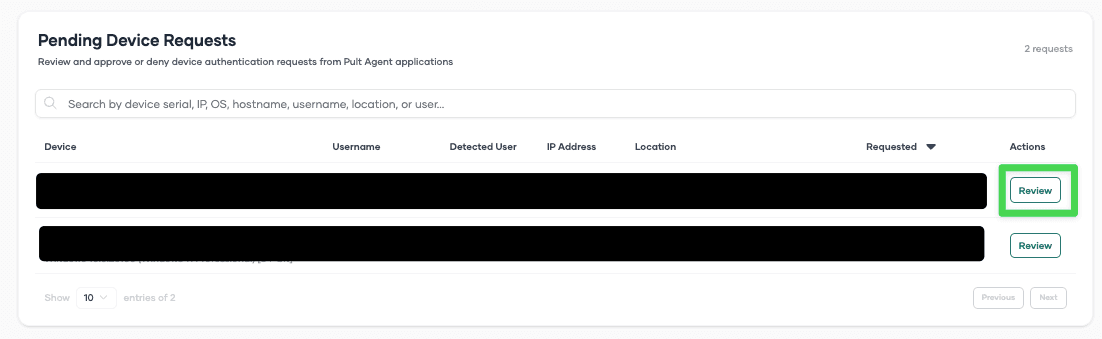
Navigate to Settings → Presence → Device Authentication. The Pending Requests section shows all requests awaiting review.
For each request, you can see:
- Device information (name, OS, serial number)
- OS username
- Source IP address
- Request timestamp
- Suggested user (if MDM auto-matching found one)
Click Review to open the review dialog. You can:
- Accept the request -- select or confirm the Pult user, then approve.
- Deny the request -- reject the enrollment.
Historical Requests
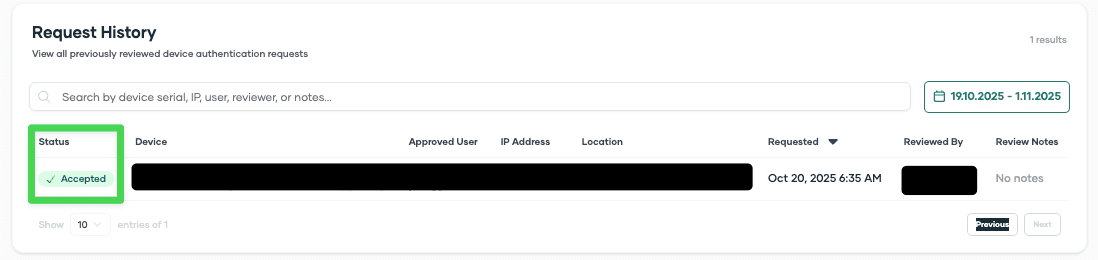
The Historical Requests section shows all previously processed requests (approved and denied), including who reviewed them and when.
Security notice: Device information such as OS, username, serial number, and device name can be spoofed. Only the IP address is reliably reported. Always verify that the request timing and IP address match expected devices in your organization before approving.
Bootstrap Tokens
The Device Authentication page also includes the Bootstrap Tokens section where you can create, view, and revoke tokens. See Bootstrap Token Deployment for details.
Last updated on May 19, 2026, 3:50 PM